I Tested End Sessions in IAM Identity Center
What survives when someone leaves, and the deny policy that stops it
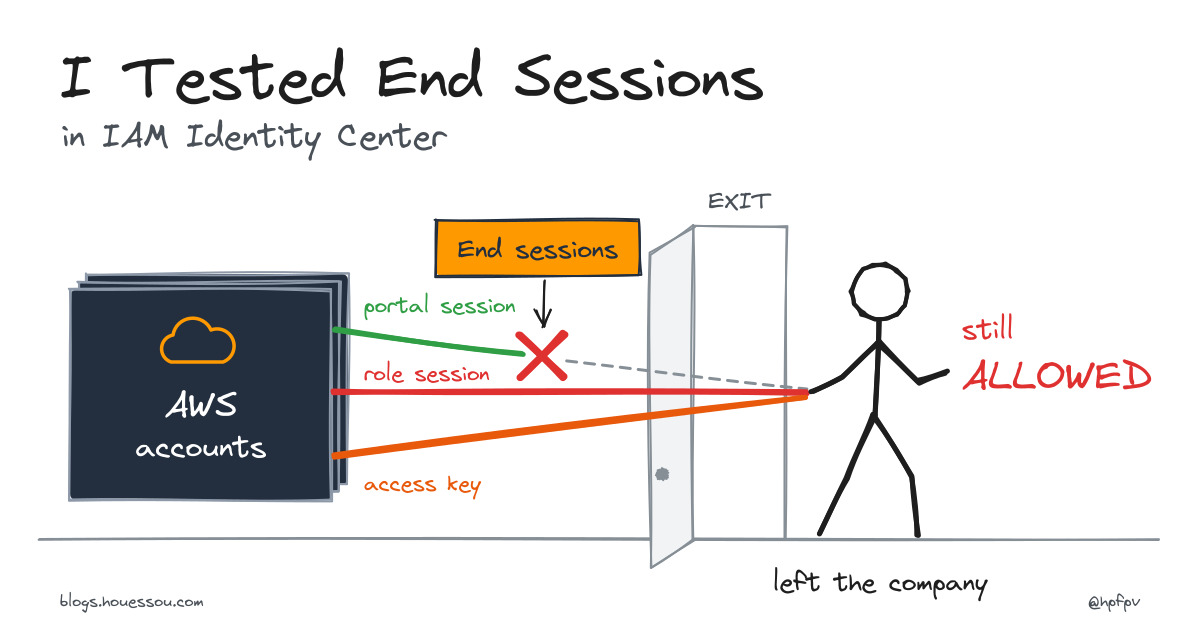
TL;DR: I tested what the End sessions button in IAM Identity Center does when someone leaves. It ends the portal session, and the role sessions already handed out keep working for up to 12 hours. The deny policy from the AWS docs, with the user's ID in an SCP, blocked those in 2 seconds. It did not stop the roles the user had assumed from them, or an access key they had created. For those I added a source identity guardrail and a second deny list, which blocked every hop in 4 seconds. The tool and the policies are on GitHub.
Hi guys! A few days ago I was talking with a colleague about what to do in AWS when someone leaves the company. IAM Identity Center has an End sessions button, and we both knew the catch: it doesn't end the sessions the person already has in the accounts.
What neither of us could say is how much survives, and for how long. So I spent an afternoon on it in a sandbox, and found a second problem on the way.
So let's talk about it.
Context and challenge
When you sign in through IAM Identity Center, you get a session with the AWS access portal. That's the page with the list of your accounts. When you click on an account, the portal hands you temporary credentials for a role in that account.
From that moment, those credentials live on their own. They don't check back with the portal. They stay valid until they expire, and depending on the permission set that's anywhere from 1 to 12 hours.
End sessions ends the first one, the portal session. The credentials that were already handed out are not affected.
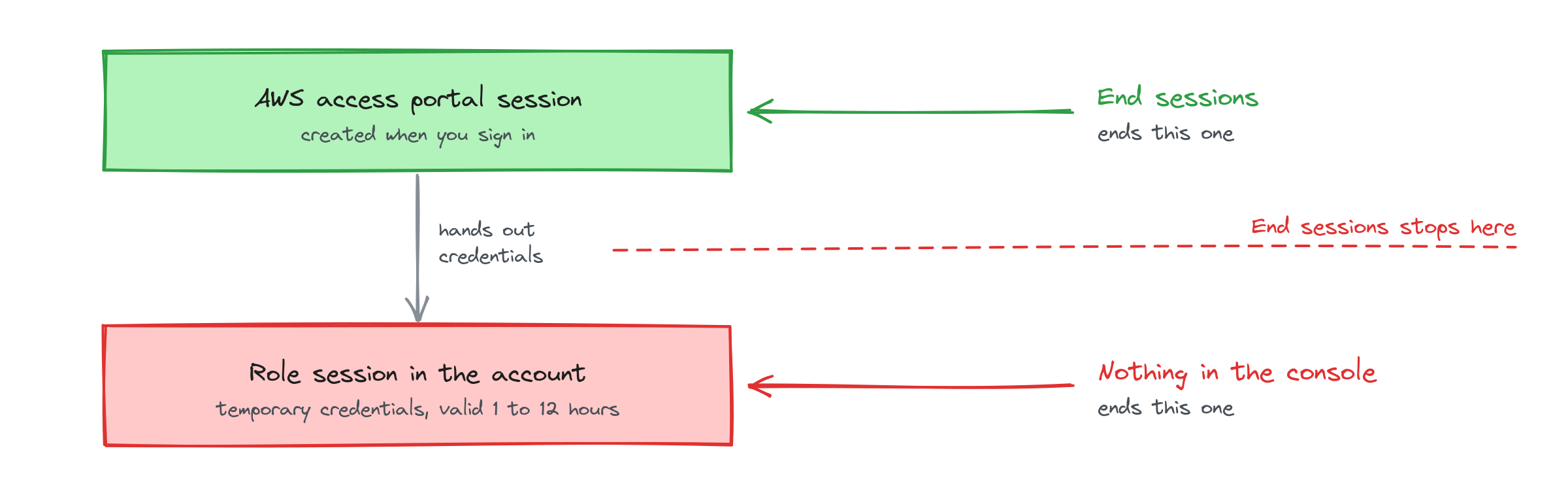
Most of the time nobody cares. But if an admin is let go and still has a terminal open, that's up to 12 hours of access.
So the challenge is this: cut one person's access right now, in every account, without touching anyone else who uses the same roles.
The lab
I built this in my personal organization: Control Tower, IAM Identity Center with its built-in directory, and two sandbox accounts.
The user is called revoke-lab. It has an admin permission set on both accounts, with 4-hour sessions.
What the leaving engineer does first
Let's say revoke-lab knows what's coming. Before anyone touches the account, they sign in as usual and do three things that any admin can do in a few seconds:
- assume a second role in sandbox 1
- assume a role in sandbox 2
- create an IAM user with an access key, and keep the key
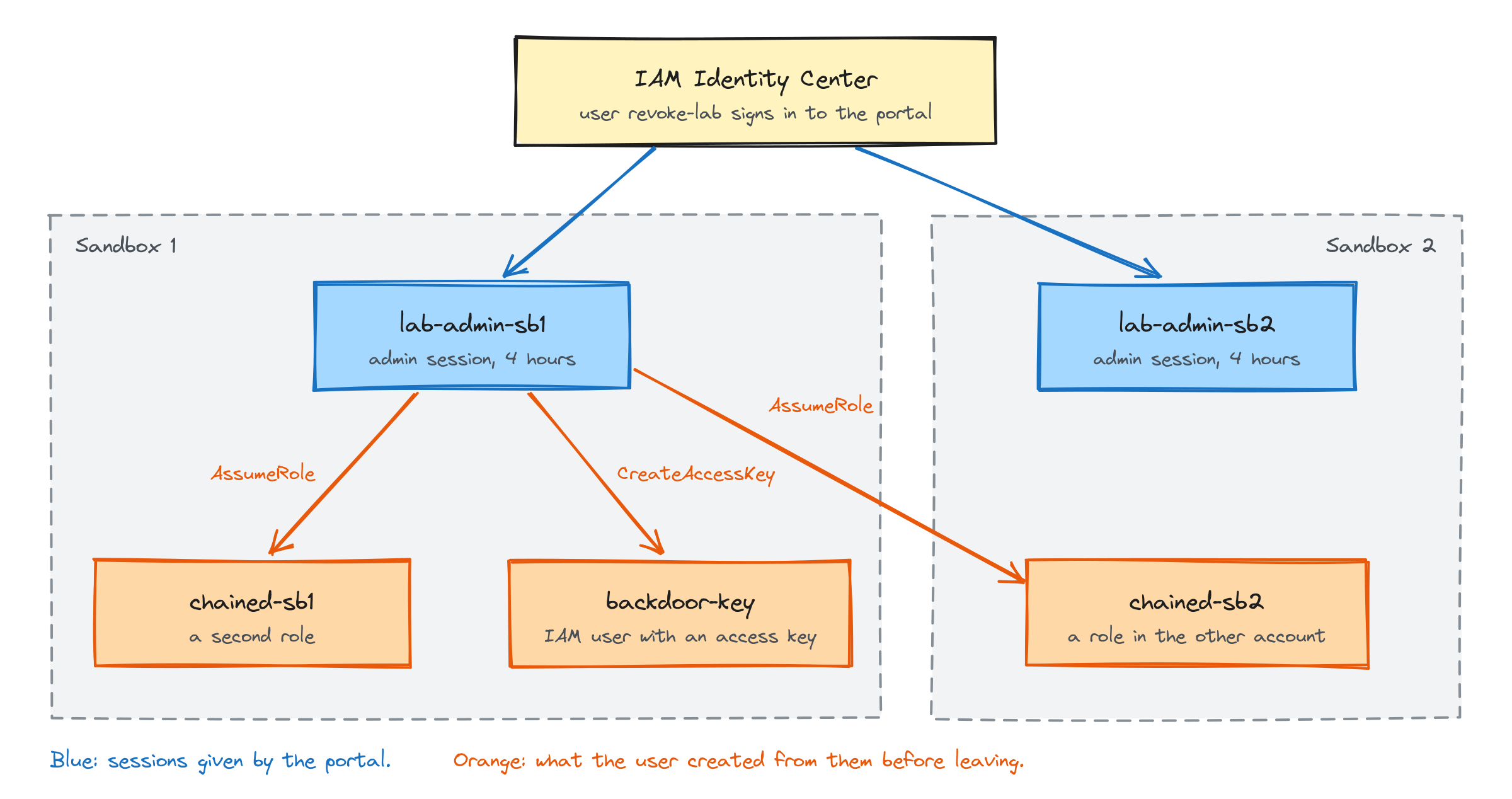
That gives five sets of working credentials. These are the names you'll see in the outputs:
lab-admin-sb1andlab-admin-sb2: the admin sessions that came from the portalchained-sb1andchained-sb2: the two roles assumed from the first admin sessionbackdoor-key: the access key
How I watched the sessions
A small script takes each set of credentials, calls AWS with it every second, and prints ALLOWED or DENIED with the time. I change something on the admin side, and I can see to the second what stopped working.
One detail if you reproduce this: don't use sts:GetCallerIdentity as the test call. It keeps answering even when everything else is denied. I used iam:ListAccountAliases.
Test 1: clicking End sessions
I opened the user in Identity Center and clicked End sessions.
The portal session ended right away. The user couldn't list their accounts any more:
UnauthorizedException when calling the ListAccounts operation
The script didn't move. Every credential still answered ALLOWED, and the CLI kept using what it had in its cache.
Then I tried the Revoke active sessions button that IAM has on roles:
UnmodifiableEntity: Cannot perform the operation on the protected role
'AWSReservedSSO_...' - this role is only modifiable by AWS
Last one: removing the user's assignment to the account. This worked once, when revoke-lab was the only user on that permission set. Identity Center deleted the role and the session died 17 seconds later. As soon as a second user shared the permission set, the role stayed and the session kept working. Permission sets are usually shared, so I wouldn't count on that.
So that's three options in the console, and none of them reliably stops a running session.
Test 2: the deny policy from the AWS docs
AWS documents another way. You can't cancel temporary credentials, but you can deny every call they make, and an explicit deny always wins:
{
  "Version": "2012-10-17",
  "Statement": [
    {
      "Sid": "DenyRevokedIdentityCenterUsers",
      "Effect": "Deny",
      "Action": "*",
      "Resource": "*",
      "Condition": {
        "StringEquals": {
          "identitystore:UserId": ["PLACEHOLDER-NOT-A-USER-ID"]
        }
      }
    }
  ]
}
identitystore:UserId is the ID of the person in Identity Center (it's on the user's page in the console). I put the policy in an SCP attached to both sandbox accounts, with a placeholder that matches nobody. Then I added the ID of revoke-lab:
15:04:58  >>> SCP: ID added (sent)
15:04:59  lab-admin-sb1    ALLOWED
15:04:59  lab-admin-sb2    ALLOWED
15:05:00  lab-admin-sb1    DENIED (explicit deny in a service control policy)
15:05:00  lab-admin-sb2    DENIED (explicit deny in a service control policy)
Both sessions were denied 2 seconds later, and only this user is affected, even if ten people share the role.
SCPs don't apply to the management account, so there I put the same deny in the permission set itself. A session in my management account was blocked 12 seconds after the change (that was the inline policy, and the 12 seconds include reprovisioning the permission set).
With the ID still in the SCP, I looked at the other three:
chained-sb1      ALLOWED
chained-sb2      ALLOWED
backdoor-key     ALLOWED
Why do the chained roles and the access key survive?
This is the part I couldn't find tested anywhere, and honestly the reason I wanted to write this post.
The deny matches on the user's Identity Center ID. That ID is attached to the session Identity Center created. When that session assumes another role, AWS creates a new session for the second role, and the ID isn't copied into it. The policy has nothing to match on.
The access key is even simpler. It belongs to an IAM user, which has no link to Identity Center at all.
A user in the deny list can't start a new chain, because their AssumeRole call is denied like everything else. So the problem is only what they set up before you revoked them.
But that doesn't go away on its own. A chained session only lasts one hour, but if the role is allowed to assume itself, the session can renew itself before it expires (I tried it and it works). And an access key doesn't expire.
Test 3: cleaning up role by role
For a chained role, Revoke active sessions does work, because it's a normal role:
15:06:38  >>> put-role-policy AWSRevokeOlderSessions
15:06:45  chained-sb1      ALLOWED
15:06:46  chained-sb1      DENIED (explicit deny in an identity-based policy)
It took 8 seconds. But it cuts every session open on that role at that moment, not just one person's. Everyone else has to assume the role again. And you have to find the role first, by searching CloudTrail for the user's AssumeRole calls.
For the access key, the only fix is to delete it, once you've found it the same way.
For one role that's fine. Across a whole organization, not really.
Test 4: making the deny follow the person
My first idea was the role session name. Identity Center names the session after the username, so an SCP can refuse any chained session that doesn't keep that name, and a second deny list on the name catches it. Nothing to change on the target roles, and it works with a normal CLI profile (role_session_name).
It works for one hop. Then I assumed a role again from the chained session, under a new name, and added the username to the list (I ran this one again a few days later with my own user, that's why the time is different):
16:01:27  >>> SCP update sent
16:01:29  hop 1 (same name)    DENIED (explicit deny in a service control policy)
16:01:30  hop 2 (new name)     ALLOWED
...
16:01:49  hop 2 (new name)     ALLOWED
The second hop starts from a normal role, and the session name is chosen again at every AssumeRole call. Nothing forces it to stay the same. I needed something that can't be changed along the way.
AWS has a feature for this called a source identity. It's a label you set on a session when you assume a role. Once it's set, it can't be changed, and it's copied into every role you assume after that.
Identity Center doesn't set one. So I added a guardrail to the SCP: two statements that force users to set it themselves, to their own username, whenever they assume a role from an Identity Center session:
{
  "Sid": "ChainingRequiresASourceIdentity",
  "Effect": "Deny",
  "Action": "sts:AssumeRole",
  "Resource": "*",
  "Condition": {
    "ArnLike": {
      "aws:PrincipalArn": "arn:aws:iam::*:role/aws-reserved/sso.amazonaws.com/*"
    },
    "Null": { "sts:SourceIdentity": "true" }
  }
},
{
  "Sid": "SourceIdentityMustBeTheUserName",
  "Effect": "Deny",
  "Action": "sts:AssumeRole",
  "Resource": "*",
  "Condition": {
    "ArnLike": {
      "aws:PrincipalArn": "arn:aws:iam::*:role/aws-reserved/sso.amazonaws.com/*"
    },
    "StringNotLike": { "aws:userid": "*:${sts:SourceIdentity}" }
  }
}
The second statement is how the policy knows whose name it is. An Identity Center session is named after the username, so aws:userid ends with it, and the label has to match. (In my lab the aws:PrincipalArn was narrower: it only matched the lab permission sets.)
Then a second deny list, on aws:SourceIdentity this time.
I ran the scenario again with the guardrail in place. si-sb1 and si-sb2 are the two chained roles, now carrying the label, and si-hop2 is a role assumed from a chained role. In the same update I added the user ID to the first list and the username to the new one:
15:09:53  >>> SCP update sent
15:09:55  si-sb2           ALLOWED
15:09:56  si-hop2          DENIED (explicit deny in a service control policy)
15:09:56  lab-admin-sb1    DENIED (explicit deny in a service control policy)
15:09:57  si-sb1           DENIED (explicit deny in a service control policy)
15:09:57  si-sb2           DENIED (explicit deny in a service control policy)
Everything was denied within 4 seconds, including the second hop.
I also tried to get around it (no label, someone else's name, a new label on the second hop). All three were refused.
One of my own roles refused the chain too. The target role has to allow sts:SetSourceIdentity in its trust policy, at every hop, and I had forgotten that one. On an existing landing zone that means updating every role people chain into, so plan it as a migration. It also breaks Switch Role in the console, which can't set a source identity.
Two limits here. I only tested the guardrail on the lab roles, so I haven't seen what it breaks on a real landing zone. And it's an SCP, so a chain that starts from a session in the management account is not covered.
For the access key I added one more statement that denies iam:CreateUser, iam:CreateAccessKey and console passwords to Identity Center roles. The call was refused. That only covers Identity Center roles, and an admin has other ways to leave something behind (a key created from a chained role, a new role that trusts an outside account), so I'd still check CloudTrail for what they created.
Key recommendations
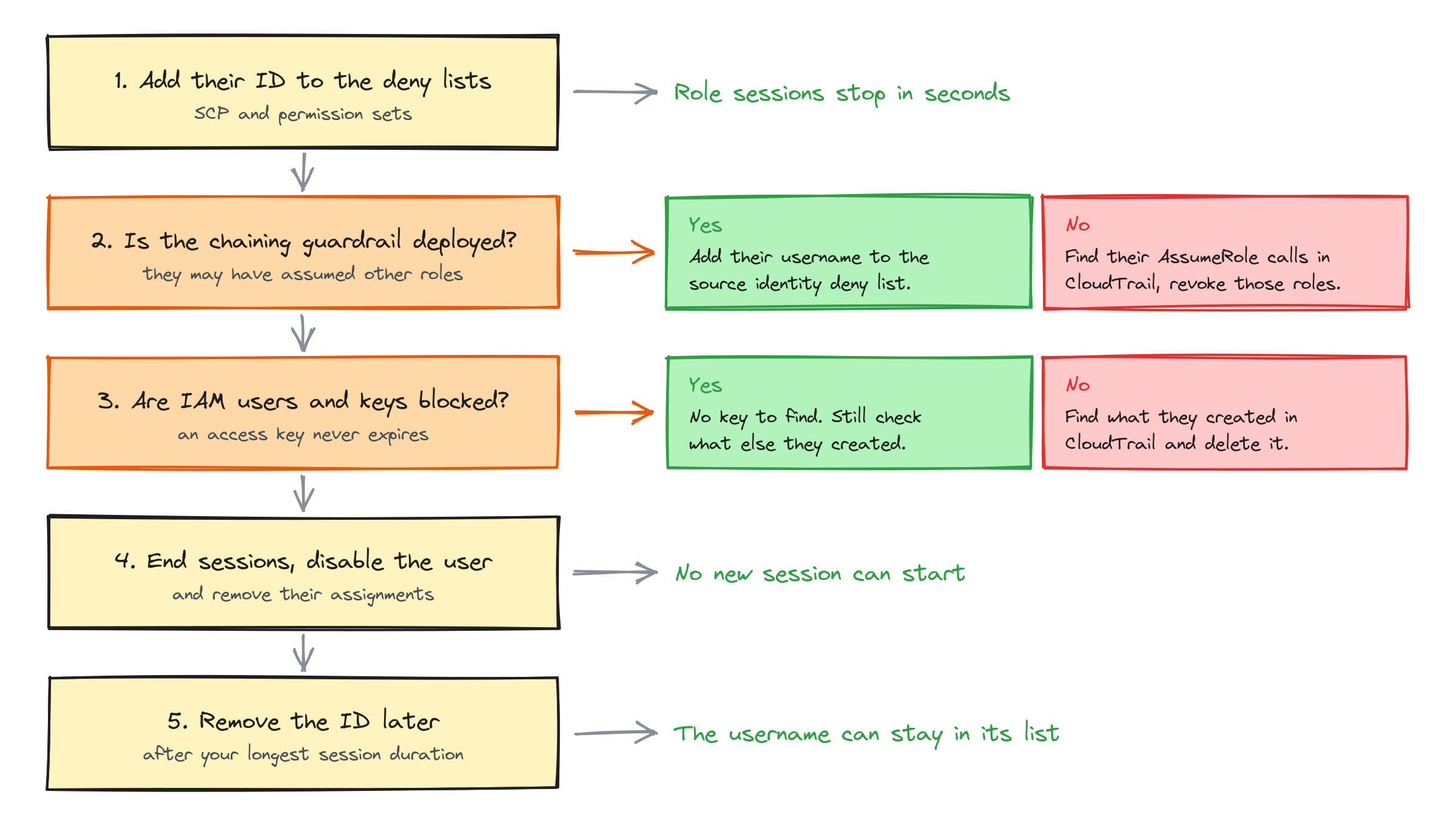
Deploy the deny lists before you need them. Put the policy in place once, with a placeholder ID that matches nobody. Then revoking someone is just adding one value to a list.
Put the list in two places. The SCP is the fastest, but it doesn't cover the management account. The permission sets do.
In the permission set, use a customer managed policy, not the inline policy. When I edited the inline policy, nothing happened until I reprovisioned the permission set. The customer managed policy I could edit directly in the account, and the session was blocked 8 seconds later.
Don't remove the ID too early. When I removed it, access came back within 2 seconds. It has to stay for as long as your longest session can last. The username in the source identity list is different: a chained session can renew itself, so I'd leave that one for good (unless you reuse usernames).
Add the source identity guardrail if you can afford the migration. Without it, revoking someone means going through CloudTrail role by role. With it, the second list catches every role they assume. The cost is the trust policy of every role people chain into.
Block IAM users and access keys from Identity Center roles. It's one statement in the SCP, and it removes the quickest way to keep access.
Don't rely on disabling the user in your identity provider. In an earlier test at work with Entra ID, a change took 17 to 40 minutes to reach Identity Center, and running sessions were not affected anyway.
Check who owns your SCPs. Most of the landing zones I work on run Landing Zone Accelerator. With its SCP revert option enabled, a change made outside the pipeline gets overwritten, and the person gets their access back without anyone noticing. In that case I'd make the quick change in the permission sets and push the SCP change through the pipeline.
Follow an order. Start with the deny lists, then deal with what the person may have chained into or created. If you start with End sessions, they keep working while you click. Ending the portal session, disabling the user and removing their assignments come after, so they can't sign in again.
Conclusion
To be fair, the AWS docs do say this: ending a session doesn't end the role sessions, and they give the deny policy. What I couldn't find is someone who had measured it, or who had looked at what happens to chained roles and access keys.
Two things I didn't test. Disable user access on its own, so that step of the order comes from the docs. And I don't run the accelerator in my personal organization, so the revert behaviour comes from its documentation and issue tracker, not from my lab.
To make the day itself easier I wrote a small Python tool, idc-revoke. It looks up the user ID from the username, adds it to every list you configured, then removes the user's direct account assignments so the portal stops offering the accounts:
uv run idc-revoke --config revoke.toml revoke jane.doe
Against the lab, with sessions in both sandboxes and in the management account, everything was blocked within 12 seconds (that run only edited the lists, removing assignments came later). There's also a restore command that takes the user out of the lists. It doesn't give back the assignments revoke removed. Those are in the report, to recreate by hand.
The tool and the policies are on GitHub: hpfpv/idc-revoke.
Try it on yourself in a sandbox, with --dry-run first and remove_assignments = false, and let me know what you see.
Happy offboarding!
Good to read:
About the author
👋 Hi, I’m @hpfpv ☁️ I’m a Cloud Infrastructure Architect | 8x AWS Certified 🚀 I build secure, scalable, and automated solutions on AWS using Terraform, CloudFormation, and CI/CD 📚 Always exploring hybrid cloud, serverless, and AI-driven architectures
Comments
Join the discussionNo comments yet. Be the first to comment.